- Step 2 - Creating the operating week
- The first challenge when creating your timetable is to build your institution's operating week correctly, as this step will be crucial for the rest of the process. The week must represent exactly the days and times the institution operates.:
- Example 1: Week starting with the first lesson at 7:30, with 6 lessons per day, except Friday which does not have the last lesson. 50-minute lessons and a 20-minute break after the 3rd lesson of the day.
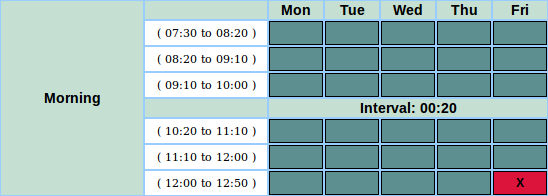
- Do not leave this step until your week is perfectly represented.
- Common question: If some class groups have different times, how do I build my week?
- Answer: If, for example, you are building the timetable for high school (6 lessons per day) and elementary school (5 lessons per day), then you must build your week with the longer period. In Step 4 you have the option to block this last time slot for the elementary school class groups.
- Only build the timetable this way if the teachers are shared between these class groups with different operating hours. Otherwise, build one timetable for elementary school and another timetable for high school. The cost will be the same, based on the total number of class groups.